Add a Guest Data Retention Policy
The Guest Data Retention Policy tab enables a property to decide what data of a guest must be retained and how long they are retained and anonymized. Depending on any of the reasons listed earlier, the property may decide to impose the policy on a guest's profile. While anonymizing, if a profile has multiple reservations in the same property, only the last Reservation (by date of arrival) and its checkout date is considered for anonymizing. The following guest data can be retained and anonymized: Name, VIP, Gender, Date of Birth, Address, Country, Phone Number, Email Address, Identification Number, Loyalty Program Details, Company Name, Anniversary, and Language.
The Data Retention Policy is applied based on the guest’s country specified in the primary address, or guest type, or both.
The Data Retention Policy is applied based on the following conditions:
-
If there is a matching policy for the guest’s country of residence and there is no guest type associated with the guest profile, the policy is applied based on the country.
-
If there is no matching policy for the guest’s country of residence, the policy is applied based on the guest type associated with the guest profile.
-
If there is a matching policy for both the guest’s country of residence and the guest type associated with the guest profile, the longest retention period between the policies for the fields to be anonymized is considered.
-
If both Data Retention Policy and Consent Policy exists for a guest, the longest retention period between the policies for the fields to be anonymized is considered.
-
If changes are made to a guest’s country of residence when common guest profile is enabled, the fields are anonymized based on the new policy associated with the updated country.
When multiple address details are configured for a guest profile, only the country mentioned in the primary address of the guest is considered. When the user tries to change or modify the guest's country (in the primary address) or changes the primary address in the Profile screen and Reservation Summary screen, and if it changes the policy applied which includes addition, removal or change in policy, the following message is displayed: Change of country might will impact the data retention policy.
The Guest Data Retention Policy/Guest Consent Policy for a guest profile is applied based on the retention period of the policies. When multiple policies are available for a guest profile, the policy with the longest retention period is considered for anonymization.
The policy with the longest retention period is considered for anonymization based on the following conditions:
-
When a guest profile has both Guest Data Retention Policy and Guest Consent Policy.
-
When a guest profile has Guest Data Retention Policy based on both the countries in the primary address and the guest type.
-
When there is more than one Guest Data Retention Policy for the address mentioned in the primary address of the guest profile.
Perform the following steps to add a data retention policy:
Navigate to Settings ➜ All Settings ➜ Data Retention Management (under General). The Data Retention Management page is displayed.
Navigate to Guest Data Retention Policy in the Retention Policy tab to set the policy for the retention of a guest's data.
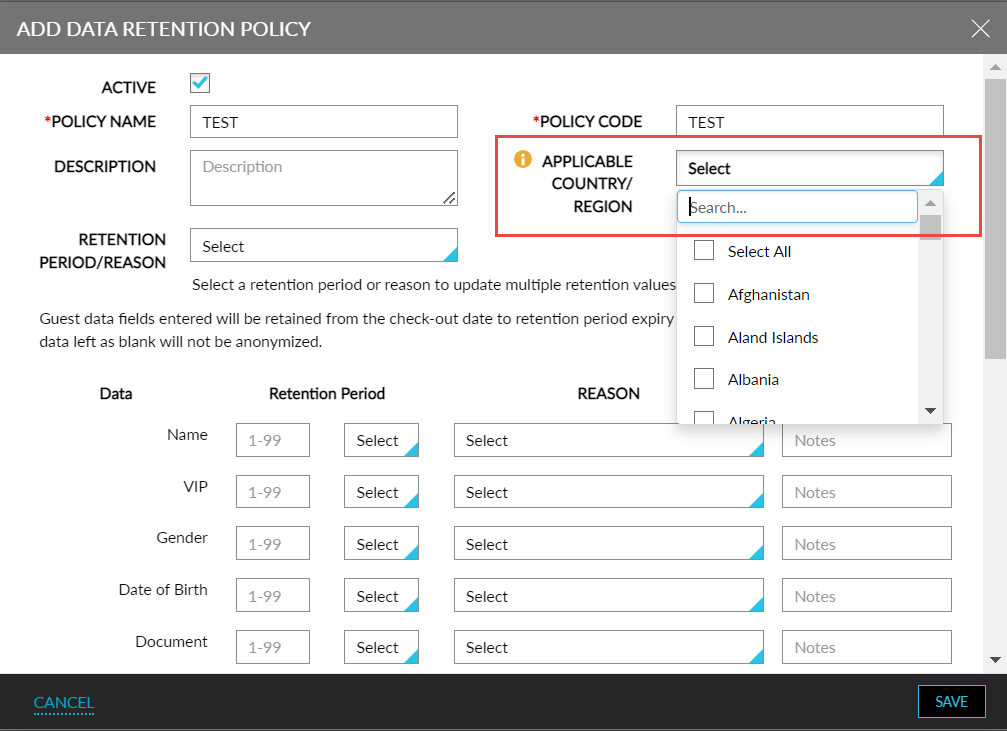
Click Add. The Add Data Retention Policy page appears.
Refer to the following table and fill in the fields to add a guest retention policy:
|
Field |
Description |
|---|---|
|
Active |
The retention policy will be available if enabled. |
|
Policy Name |
The relevant name for the guest data retention policy. |
|
Policy Code |
A unique code to identify the policy. |
|
Description |
A brief description of the policy. |
|
Applicable Country/Region |
Select the countries that the policy must be applicable for. The same country can be associated with any number of policies. |
|
Retention Period/Reason |
Select retention period or reason and click Apply to All to update multiple retention values at once. |
When multiple policies exist for a country, the longest retention period between the policies is considered. Whenever the selected country in the existing policies is removed or modified, the policy applied for the guest profile should be updated accordingly.
The applicable country/region setup must be done at Customer level and not at the property level.
Data fields entered will be retained from the checkout date to the expiry date of the Retention Period. After this the data gets anonymized. Guest data left blank will not be anonymized.
Click Save. The data retention policy is now successfully added.
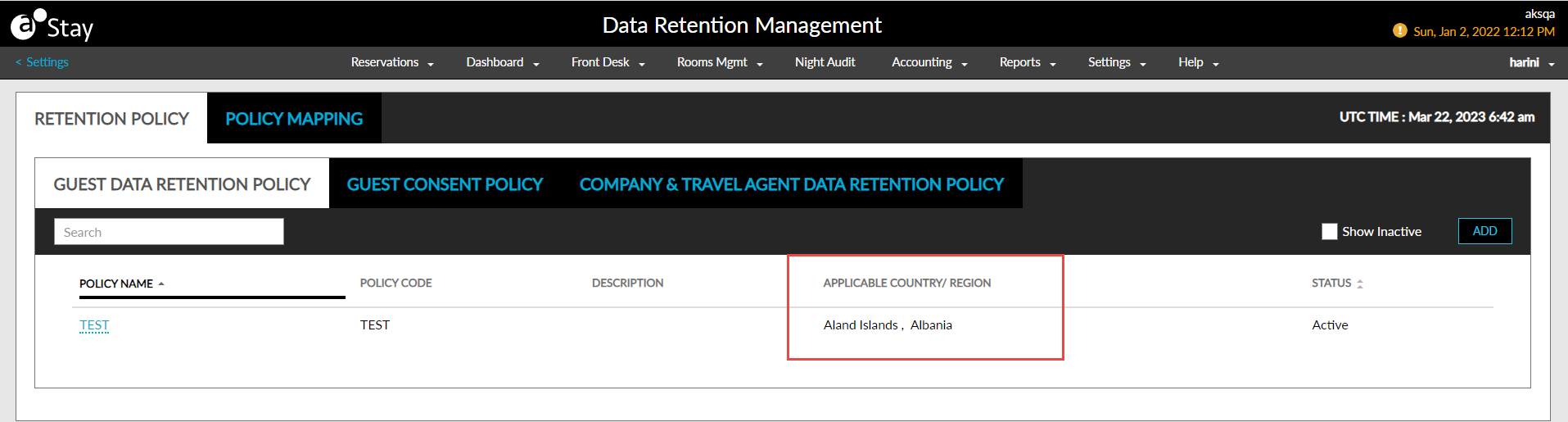
The Applicable Country/Region column in the Guest Data Retention Policy dashboard displays the countries selected in the policies.